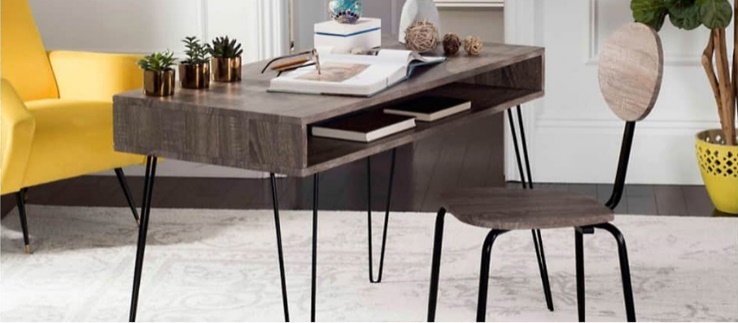
Here’s the misconception that costs home office buyers real money: the furniture is the expensive part, so protect the furniture first. Buy a solid desk, maintain it well, and the rest sorts itself out. Anyone who’s paid $300 at the Apple Store to replace a cracked iPhone screen already knows exactly how wrong that calculation is.
A well-maintained wood desk can last decades. A scratched camera lens on your iPhone 17 Pro is permanent. This guide covers both sides of that problem — the furniture that accumulates damage slowly over months, and the devices that can be wrecked in a single afternoon — with real products, real prices, and a clear order of what to do first.
Why Desk Damage Is Slow, Silent, and Easy to Underestimate
The Four Damage Mechanisms Working Against Your Desk Every Day
Wood and wood-veneer surfaces don’t fail all at once. They fail through four overlapping mechanisms that all operate simultaneously, which is exactly why people underestimate the problem until it’s past the easy-fix stage.
- Mechanical abrasion: dragging keyboards, USB cables, and hard drives across the surface leaves micro-scratches that are invisible at first and obvious under raking light by month three. Every pass of a rough surface takes a microscopic layer off the finish.
- Thermal damage: a laptop placed directly on a lacquered wood surface pumps heat at 50–70°C through its exhaust vents under load. Over months, this creates white hazing in the finish — sometimes a visible ghost outline of the laptop’s exact footprint.
- Moisture penetration: water rings from cups left without coasters penetrate standard lacquer finishes within 20–30 minutes if not wiped. On bare or tung-oiled wood, faster. Once the ring is set and dried, it doesn’t buff out.
- UV fading: a window hitting the same desk spot every afternoon will visibly fade the wood tone in that area within 12 months. Often one side of a desk goes measurably lighter than the other from uneven sun exposure.
None of these is catastrophic on its own. Together, across 12 months of daily home office use without any protection or maintenance, they turn a desk that looked sharp in the showroom into something that looks like a second-hand find.
The Damage Timeline: What to Expect
Month one or two: nothing visible. Possibly faint micro-scratches if you look hard under direct light. Month three or four: first heat marks near the laptop zone, first water rings if coasters aren’t in use. Month six: noticeable finish wear in the wrist-rest area — skin oil softens many lacquers slowly over time. Month nine to twelve: visible UV fade on surfaces near windows, and the cumulative micro-scratches start reading as general dullness rather than individual marks.
The pattern that catches people is this: the damage becomes obvious only after it’s past the easy-fix stage. Light micro-scratches respond to a scratch-cover product. Deep heat marks and finish crazing need sanding and refinishing. The difference between those two outcomes is usually just whether you addressed it at month six or waited until month twelve.
When Maintenance Won’t Cut It Anymore
If the finish is bubbling, peeling, or worn through to bare wood in multiple spots, no surface product will save it. That’s a full refinishing job: 220-grit sand back to bare wood, two coats of danish oil or polyurethane with light sanding between coats. A $15–20 materials cost that takes one weekend afternoon and resets the surface completely. Not complicated — but far easier to prevent than to fix.
Desk Surface Products Worth Buying
| Product | Price | Best Use Case | What It Won’t Do |
|---|---|---|---|
| Howard Feed-N-Wax (16 oz) | $12 | Conditioning and preserving unfinished or lightly finished wood; apply every 3–4 months | Won’t fix existing scratches or heat marks |
| Guardsman Furniture Scratch Cover (light or dark wood) | $8 | Masking existing micro-scratches on wood surfaces; quick cosmetic fix | Visible under direct light; temporary, not structural |
| Durable Desk Pad (70x50cm) | $28 | Full work-zone coverage; dual monitor setups; laptop placement on wood | Hides the wood grain; some find it aesthetically flat |
| Artistic Veltex Desk Pad (36×20 in) | $18 | Single-monitor setups; writing surface protection; smaller desks | Edges can curl after 6+ months without weight on them |
| PU Leather Desk Mat (generic) | $25–$40 | Aesthetic-priority setups; executive-style desks where looks matter most | PU surface cracks within 2–3 years; real leather needs regular conditioning |
Howard Feed-N-Wax is the maintenance baseline — apply it every quarter on any unfinished or oil-finished wood surface. For existing scratch coverage, Guardsman works honestly well enough for a work surface. For physical zone coverage on a busy desk, the Durable pad is the more durable long-term choice over the Artistic Veltex, though both work fine for their respective desk sizes. Skip the PU leather mat unless appearance genuinely outranks longevity in your priorities.
One thing that consistently destroys wood finishes and gets ignored: cleaning products. All-purpose kitchen sprays, glass cleaners, and anything containing ammonia will strip lacquer over repeated use. A barely-damp microfiber cloth is the correct tool for weekly desk cleaning. That’s it. Harsher chemicals belong nowhere near a finished wood surface.
iPhone Screen Protection for People Who Work From Home
Working from home changes your phone’s risk profile. It lives on your desk during calls. It goes in your pocket during errands. It gets set down on a dozen different surfaces throughout the day. And when you’re on a video call, your screen is occasionally visible to whoever else is in the room — a partner, a kid walking in, a roommate passing by.
The iPhone 17 Pro starts at $999. Two pieces of exposed glass take the most daily contact: the front screen and the camera module lenses. Both are straightforward to protect before damage happens. Both are expensive to address after.
Front Screen: Why a Privacy Protector Makes More Sense for Home Office Use Than a Clear One
Most people default to a clear tempered glass protector without really stopping to think about it. For home office use specifically, there’s a more practical default.
A privacy screen protector uses a polarizing filter layer that limits the viewing angle to roughly 30 degrees from center. Anyone not directly in front of the screen sees only black. That matters when someone walks behind you while you’re reading messages. It matters when you’re on a video call and your phone screen is peripherally visible to whoever else is in frame. Small thing until it isn’t.
The WSKEN Privacy Screen Protector for iPhone 17 Pro ($23.09 for a 2-pack) adds blue light filtering on top of the privacy layer — useful if your evenings involve reading on your phone after a full day of screen time. The auto-dust removal installation kit included with the pack addresses the most common screen protector failure mode: dust trapped under the glass during application creates bubbles that spread and can’t be pressed out. Rated 4.2/5 across 374 verified reviews.
One installation tip that genuinely reduces bubble rate: run a hot shower for two minutes before applying the protector, then install in the bathroom while the steam is still present. Moisture settles airborne dust particles. It sounds like a workaround; it’s actually reliable enough that most experienced phone repair technicians use humidity-controlled environments for exactly this reason.
Camera Lenses: The Part Most People Skip Until the Scratch Is Already There
The camera module on the iPhone 17 Pro sits proud of the body. Every time the phone is set face-up on a desk, table, or nightstand, the camera lenses are the contact surface — bare optical glass against whatever is below it, repeated dozens of times each day.
The WSKEN Camera Lens Protector in Glitter Orange ($16.99) uses a metal aluminum alloy ring with tempered glass inserts over each lens. The ring does two things: it covers the lenses with harder glass, and it raises the camera module slightly above flat surfaces so the lenses themselves don’t make contact when the phone is laid face-up. That second function is arguably more valuable than the first. Over 4,100 reviews at 4.1 stars — the review volume alone indicates the fit and installation process are reliable across different buyers.
Camera lens scratches on the 17 Pro are not repairable. Apple’s service pricing for camera glass damage on the Pro line runs $80–$150 depending on severity and model. A $17 protector is not a close call.
Privacy Filter vs. Clear Tempered Glass: The Real Trade-offs
Does a Privacy Filter Actually Hurt Screen Brightness?
Yes, by roughly 10–15%. The polarizing layer that creates the privacy effect absorbs some light transmission. In a normally lit room, most people don’t notice. In direct sunlight outdoors, the screen reads noticeably dimmer than without the protector. That’s the primary functional trade-off and it’s real — not marketing language in either direction.
When Does a Standard Clear Protector Make More Sense?
If you work alone in a private room, never need to show your screen to someone sitting beside you, and want maximum brightness — a clear protector is the better choice. Belkin UltraGlass 2 ($40 for a 2-pack, iPhone 17 Pro compatible) and Zagg InvisibleShield Glass Elite ($45 single) are the two established benchmarks in clear protectors. Both use harder glass than budget options and come with alignment trays that make installation straightforward. For pure scratch resistance without the brightness trade-off, either one is better than most alternatives at their respective price points.
The value math, though: Belkin’s 2-pack works out to $20 per protector. The WSKEN privacy 2-pack is $23.09 total — $11.55 per protector. If the privacy and blue light features apply to your situation, the WSKEN pack wins on value by a significant margin. If you only want the clearest, hardest glass available, Zagg’s Glass Elite is the top of the market for clear protectors.
Is the Blue Light Filtering Useful or Just Marketing?
The research on blue light and sleep quality is genuinely mixed. The subjective experience of using a warm-tinted screen at night, though, is consistently reported as more comfortable than the alternative. Blue light filtering in screen protectors cuts wavelengths in the 400–450nm range — the blue-violet spectrum. The screen takes on a slightly warmer tone that reduces perceived glare in low-light conditions. For a home office worker staring at a phone at 10pm after eight hours of monitor time, that’s a real quality-of-life difference, even if the sleep science debates the mechanism.
Five Habits That Do More Damage Than Any Accident
Products matter. Habits matter more. These are the five ways home office setups get quietly destroyed over time — none of them dramatic, all of them preventable:
- Cleaning wood with the wrong products. All-purpose kitchen sprays and any cleaner containing ammonia will strip lacquer finishes over repeated use. Use a barely-damp microfiber cloth for weekly cleaning. For deeper cleaning, use only a heavily diluted wood-safe soap. Nothing harsher.
- Placing laptops directly on bare wood. The exhaust zones on most laptops reach 60–70°C under moderate load. That heat damages lacquered finishes over time, leaving white hazing or a visible outline of the laptop base pressed into the finish. Use a laptop stand or a desk pad between the machine and the surface.
- Installing screen protectors without dust control. Dust trapped under the glass during installation creates bubbles that spread and can’t be removed without lifting and reapplying the protector. The bathroom steam method mentioned earlier is a real fix. So is working quickly and having the phone, wipes, and protector all laid out before peeling any backing film.
- Skipping coasters. Water rings are permanent on many finishes once dry. A cork or silicone coaster costs $3 and prevents the single most common desk surface stain. The math is not complicated.
- Using paper towels on screens or polished furniture. Paper towels are abrasive at a micro level. They scratch phone screens and dull lacquered furniture finishes over repeated use. Microfiber cloths only — and keep a dedicated set for screens.
The Protection Priority Order for a New Home Office Setup
Camera lens protector first. It’s $16.99, applies in five minutes, and prevents the only damage mode on this entire list that is completely irreversible. Nothing else in a home office protection plan has that ratio of cost to consequence.
Screen protector next. For home office use, the privacy screen 2-pack at $23.09 is the practical default — two protectors with blue light filtering and viewing-angle privacy for less than one Zagg Glass Elite. If privacy and blue light don’t apply to your situation, Belkin UltraGlass 2 is the clear-protector benchmark worth paying for.
For the desk: Howard Feed-N-Wax every quarter on any unfinished or oil-finished wood. Add a desk mat if you place a laptop directly on the surface or work across dual monitors. That’s a complete maintenance routine — under $50 total in products, 15 minutes of quarterly effort, and a surface that holds up for years rather than months.
The person who set up their home office six months ago and focused entirely on the desk — assuming the phone would take care of itself — now has a desk that looks perfectly fine. The iPhone camera lens has a hairline scratch that showed up somewhere between the kitchen counter and the coffee table. The desk is still waiting for its first coat of Feed-N-Wax, but it doesn’t need it yet. The lens protector would have been $17. The Apple service estimate came back at $110. Protect the irreplaceable things first.